
LLM Transcript
In worker interaction web forms, an llmTranscript element displays an llm.agent: chat transcript.
start:
  # ... Run llm.agent:
  await:
    form:
      title: Cerb Docs Q&A
      elements:
        llmTranscript/prompt_transcript:
          session_id: {{results.session_id}}
          hidden@bool: {{prompt_user is empty}}
          layout: conversation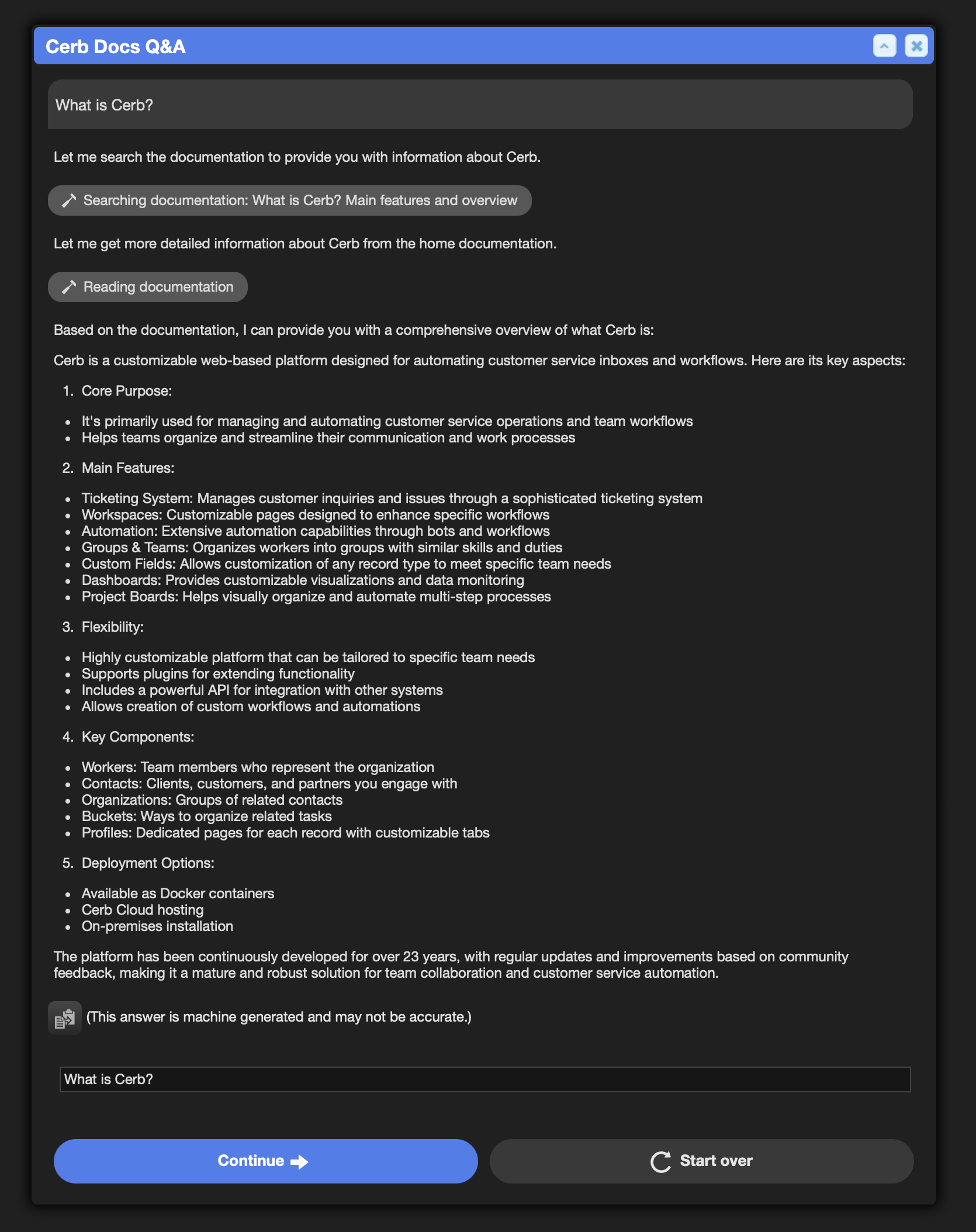
Syntax
session_id:
The transcript ID to display. This can be retrieved from llm.agent: output.
You can instead mint one ID with {{uuid()}} and pass it to the agentPrompt element, llm.agent:, and this element, so all three work on the same conversation. See session_id:.
agent:
Who the transcript says is speaking. Without it, every agent turn is bylined "Agent" and its avatar is the model provider's mark.
Name an AI worker and the name and avatar come from that record:
llmTranscript/transcript:
  session_id: {{session_id}}
  agent: '@cerb'
It accepts an @mention, a worker ID, or a cerb:worker:<id|handle> URI – the same forms llm.agent: takes – and a human worker is refused.
Or write the identity inline, for a chat with no worker behind it:
llmTranscript/transcript:
  session_id: {{session_id}}
  agent:
    name: Cerb
    icon: bot
color: blue| Key | Notes |
|---|---|
name: |
The byline on every agent turn |
icon: |
A cerb-icons name for the avatar |
color: |
A Cerb UI hue – red, blue, green, gray, orange, or purple – or any CSS color |
A hue resolves to the theme's own color rather than the CSS keyword of the same name, so it matches every other pill and tag in the product. Left out, the color is hashed from the name, which is stable but not chosen.
The model stays visible either way: its mark moves to a small badge on the lower right of the avatar, in the provider's brand color, so a reader can see who they're talking to and still see that it's an AI.
This is display only. Nothing is written to the conversation, so an agent renamed
today relabels the chats it already had. Naming an AI worker on
llm.agent: is what
gives a chat a real identity -- attribution, memory, and credentials.
label:
An optional label displayed above the transcript.
view:
How message content is rendered.
| Value | Notes |
|---|---|
markdown |
The default – render Markdown |
text |
Render each answer's raw Markdown source instead |
toggle |
Render Markdown, and offer a Markdown / Text switch |
The switch isn't shown unless you ask for it with toggle. When you do, it's a persistent row above the first turn rather than a per-turn control.
Only agent turns carry a source, so under text a turn without one keeps its rendered body rather than going blank.
layout:
How turns are arranged. Both layouts build the same content from the same turns – nothing is dropped or moved outside its turn, and each turn keeps one sender and timestamp header.
| Value | Notes |
|---|---|
interleaved |
The default – author order, so each remark sits with the work it introduced. Reads as a step log |
conversation |
The answer's prose pools first, with the turn's work in one thread beneath it. Reads as a chat reply with footnotes |
thinking:
How the model's reasoning is shown.
| Value | Notes |
|---|---|
summary |
The default – a one-line summary, e.g. "Thought for 5 seconds" |
raw |
The same line, plus the reasoning text in an expandable body beneath it |
hide |
Drop it entirely |
tools:
How tool calls are shown. The values work the same way they do for thinking:.
| Value | Notes |
|---|---|
summary |
The default – a one-line summary and an icon, e.g. "Searched the knowledge base" |
raw |
The same line, plus an expandable body with the call's parameters and its result |
hide |
Drop it entirely |
raw adds to the summary line rather than replacing it, so a row reads the same whether or not it's expanded. The summary itself reads as active or past depending on the state of the call – "Searching the knowledge base" while it runs, "Searched the knowledge base" once it's done.
Tool display names and icons aren't configured here, and they show in every mode. They're set on the tool itself – on an agent tool record, or with labels: (summary: and active:) and an icon: in llm.agent: – so one definition covers every transcript the tool appears in.
These keys control what's displayed. They aren't an access control -- a transcript's
payloads reach the worker's browser whichever mode you choose, and summary and
hide are applied there. The audience is the authenticated worker whose own
interaction it is, so don't rely on these to withhold anything from that worker.
expand:
Which bodies start open.
| Value | Notes |
|---|---|
latest |
The default – only those in the newest agent turn |
all |
Every one |
none |
None |
This seeds raw bodies only. A summary row has nothing to expand, so with thinking: and tools: left at their defaults, expand: has no visible effect.
tokens:
When yes, show per-turn token usage and how much of the model's context window the session is using. Off by default.
A turn that was truncated or filtered is badged regardless of this setting, since that's what explains an answer stopping mid-sentence.
llmTranscript/transcript:
  session_id: {{session_id}}
  layout: conversation
  thinking: summary
  tools: summary
  expand: latest
  tokens@bool: yes
hidden:
This form element can be conditionally hidden.
hidden@bool: {{not prompt_user}}